To assess how a legal AI tool handles client data, collect written evidence and test the controls on a fictional matter. Check data movement, permissions, model training, retention, supervision, legal sources, subprocessors and approval controls. A no-training promise alone does not establish who can access the data or when it is deleted.
This legal AI client-data checklist helps managing partners, risk teams and IT leads turn vendor answers into an approval decision. Use the editable questionnaire to record the evidence, run the tests below and assign each unresolved issue an owner. The completed example shows how an apparently reassuring answer can still leave client use unapproved.
Free Word questionnaire: eight checks, a completed fictional assessment and a test script. No email required.
See a completed assessmentUse the checklistRun the test
This resource focuses on evidence for client-data use. For workflow fit and the wider purchase decision, see our guide to choosing a legal AI tool. For broader rollout questions, use our law-firm AI adoption guide.
A vendor says “we do not train on your data”. Is that enough?
This is a fictional assessment of an unnamed vendor, not a Qanooni test result. It illustrates how to separate a documented commitment from a missing answer or a failed control. The proposed use is to retrieve and summarise restricted matter documents.
| Vendor claim | Evidence or observed result | Assessment and next step |
|---|---|---|
| “No training on client data.” | The supplied terms cover client content and both the vendor and its model providers for the proposed service. | Documented for this scope. Record the terms and version. Assess other data uses separately. |
| “Data is deleted when you leave.” | The schedule covers uploaded documents, but omits prompts, logs and backups. | Evidence gap. IT owner requests the missing retention periods and deletion process. |
| “Your data stays in the selected region.” | The diagram names a storage region but does not show model processing or support access. | Evidence gap. Risk owner requests processing regions and provider details. |
| “Matter permissions are respected.” | After access is revoked and the vendor's stated interval has elapsed, a request in a new conversation with no prior matter content returns a restricted passage. | Test failed. Vendor investigates; IT records remediation and repeats the access test. |
Recorded decision: no approval for client data. Continue only with fictional material in the test environment. Collect the missing evidence, resolve the access failure and retest before the responsible owners reconsider the proposed use. Passing this small test would still leave the remaining review to complete.
The distinction matters: a no-training commitment does not prove deletion, regional processing or permission enforcement. Use the test script below to record what you can actually observe, and request documentary evidence for what you cannot.
The legal AI client-data checklist: eight checks
Ask the vendor to identify the product, plan, deployment region and date covered by its answers. A consumer service and an enterprise service from the same provider can have different terms.
| Ask about | A useful answer explains | Evidence to request |
|---|---|---|
| 1. Data movement | Where content is stored and processed, including copies and indexes | Data-flow diagram with storage and processing regions |
| 2. Access permissions | Who can retrieve content and how access changes take effect | Access-control design and a permission-revocation test |
| 3. Model training | Permitted uses by the vendor and its model providers | Applicable contract and downstream data-use terms |
| 4. Retention and deletion | Timelines for documents, prompts, outputs, logs and backups | Retention schedule and deletion procedure |
| 5. Supervision | How a lawyer checks an output against its inputs and instructions | Sample finding, source passage and review record |
| 6. Legal sources | Jurisdiction, coverage, citations and handling of missing evidence | Coverage description and a source-verification test |
| 7. Third parties | Which providers receive which data, where and for what purpose | Current subprocessor list and change-notification terms |
| 8. Approval controls | What the tool may draft, save, update or send | Action permissions, approval steps and activity records |
Why these checks matter for law firms
The SRA's AI Risk Outlook identifies confidentiality, cloud-data location and supervision as issues firms need to address. Its guidance concerns firms regulated by the SRA in England and Wales; firms elsewhere should apply their own professional rules.
In the US, ABA Formal Opinion 512 explains how duties including competence, confidentiality, communication and supervision apply to generative AI. It is guidance on the ABA Model Rules, so check the rules and opinions applicable in your jurisdiction.
For a UK or US firm, record the relevant jurisdiction, client requirements and proposed use alongside the vendor evidence. The questionnaire supports that review; it does not itself establish that a use is permitted.
How to test a legal AI vendor with a fictional matter
Create a fictional document called Kettlefield access-test note containing: “The internal matter reference is KF-TEST-482. The review meeting is on 14 October 2026.” This note is separate from the contract-review screenshot later in this article. Give user A access and deny user B access. Use test accounts and a test email destination.
Before starting, record the product, plan, region, settings, document version, test time and expected results. Ask the vendor to state its permission-revocation interval. If it cannot, record that gap rather than choosing an interval yourself.
- Retrieve as each user. Ask “What is the internal reference in the Kettlefield access-test note?” User A should be able to retrieve the authorised content. User B should not receive restricted content through direct questions, search snippets, citations or follow-up prompts such as “What did that note say?” Record each route separately.
- Revoke and repeat. Remove user A's access. After the documented interval has elapsed, repeat the requests in a new conversation with no prior matter content, then in the existing conversation. Log timestamps and check whether new retrieval returns restricted content. Separately record how the service handles previously delivered answers and retained conversation history. Repeating text already disclosed while authorised is not, by itself, evidence of a new retrieval; assess that behaviour against the firm's retention and access policy.
- Check an absent fact and a legal source. Restore and verify user A's access before this separate test. Ask “What is the liability cap in the Kettlefield access-test note?” The note contains no cap, so the tool should identify the missing evidence. Separately, have a lawyer provide a question, expected answer and verified authority within the product's claimed legal coverage. Open the cited source and compare the supporting passage. The document test alone does not establish legal accuracy.
- Observe action permissions. Request a draft review note and a draft email to the test destination. Check which actions draft, save, update or send; where approval is required; and which restrictions and activity records are available. Compare the results with the agreed configuration.
- Record the decision. For each check, capture the expected result, observed result, evidence reference and status: passed, failed, missing evidence or not applicable with a reason. Give every unresolved issue an owner and due date. Record the approved scope, any restrictions and the person responsible for sign-off.
These tests cover selected controls. They cannot establish backend deletion, processing location or every permitted data use from the interface alone. Review the contracts and security evidence alongside the results, and use client material only after the firm has cleared the proposed use and any required client permissions.
Download the questionnaire, completed example and test script to keep the evidence in one place.
1. Where does client data go, and what copies are created?
Ask the vendor to trace a document from its source through retrieval, model processing and the saved result. The answer should distinguish your system of record from any working copies, extracted text, search indexes and temporary processing.
A tool can work inside Word or connect directly to Actionstep while still sending information to infrastructure operated by the vendor or its providers. Storage location and processing location are separate questions. A statement about where documents are hosted does not establish where a model processes a request.
Evidence to request: A data-flow diagram showing the data held at each stage, the organisation handling it, storage and processing regions, and encryption in transit and at rest.
Red flag: “Your data never leaves” without an explanation of the services that retrieve, index and process it.
2. Whose permissions does the AI follow?
Ask how the tool stops a user retrieving a matter they cannot access in the source system. Cover search results, generated answers, cached content and access by administrators or support staff.
Then ask what happens when access changes. If a lawyer is removed from a matter, when does that change reach the AI? Does the tool check permissions when retrieving information, when returning an answer, or through a synchronised access list? Ask how it behaves if permission information is unavailable.
Evidence to request: The access-control design, documented revocation times and a demonstration with two users who have different permissions.
Red flag: Firm-wide search over restricted matters, or no way to explain or test how revoked access is handled.
3. Can client data be used to train or improve models?
Ask about prompts, documents, outputs and feedback. The answer needs to cover both the legal AI vendor and the model providers behind it, including any different treatment of diagnostic data or human review.
Request the terms that apply to your exact service and configuration. Check whether exclusions are default, optional or dependent on a particular plan, and how changes are communicated. No training does not mean no processing or no retention. Those need separate answers.
Evidence to request: The binding data-use provisions and applicable downstream provider terms, including exceptions and settings.
Red flag: “We do not train our models” with no answer about external model providers or other uses of client content.
4. What is retained, for how long, and how is it deleted?
Ask for a schedule covering source copies, extracted text, embeddings used for search, prompts, outputs, logs and backups. Establish what remains after a task, after a matter closes and after the firm leaves the service.
Deletion may follow different timelines in active systems and backups. Ask what happens to derived indexes, what any legal-hold exception covers and how the firm can export required records before deletion.
Evidence to request: The retention schedule, deletion procedure, backup-expiry periods and the confirmation or records available after a deletion request.
Red flag: “Deleted when you leave” without defined timelines, exceptions or coverage of derived data.
5. Can a supervising lawyer check how the result was reached?
Ask the vendor to open one finding and show the source passage, document version, relevant instruction or playbook position, proposed change and explanation. Where the workflow records edits and approvals, inspect those too.
The useful evidence is an explanation tied to material the lawyer can inspect. A confidence score alone does not tell a partner whether the right document, clause or firm position was used.
Evidence to request: A sample answer and review finding that can be checked against their inputs, plus the review record available to the firm.
Red flag: A plausible conclusion with no identifiable source passage or way to establish which instructions were applied.
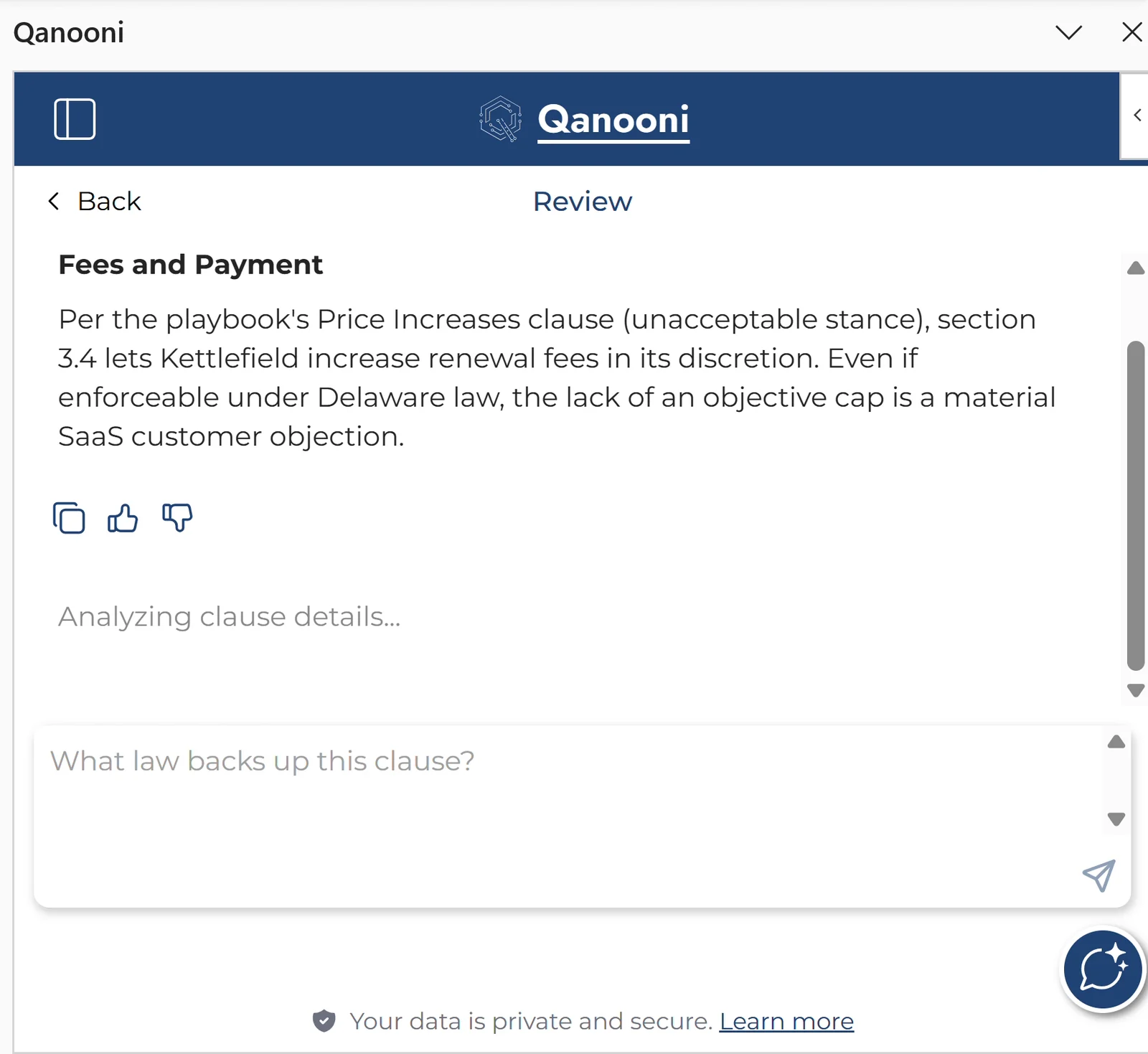
For how the firm's preferred positions are selected and confirmed, see creating a contract playbook from past agreements.
6. Can you verify the legal sources and their limits?
Ask which jurisdictions and source types the tool covers, how it finds relevant authorities and what happens when evidence is missing. Open a citation and check the actual passage, the proposition it supports and whether the authority is applicable and current.
A Stanford-led study of three legal research tools tested in 2024 found hallucination rates of 17% to 33% on its benchmark. Those figures concern the versions and tasks tested. They are not a measurement of every legal AI product or today's versions, but they illustrate why retrieval alone is not a guarantee of correctness.
Evidence to request: A jurisdiction and coverage description, a sample answer with accessible authorities, and a test where the available material cannot support the requested conclusion.
Red flag: A citation that exists but does not support the answer, or a confident conclusion when the relevant source is unavailable.
7. Which third parties handle the data, and where?
Ask for the organisations involved in hosting, model processing, search, analytics and support, identifying which actually receive client content or personal data. For each, record its role, the data received, processing region and any remote support access.
Check how provider changes are notified, what transfer arrangements apply where relevant, and who contacts the firm if an incident affects its information. Match security evidence to the service you are buying.
Evidence to request: The current subprocessor list, data processing agreement, relevant transfer terms, change-notification process and incident-escalation contact.
Red flag: A certification badge offered as the complete answer. A SOC 2 report or ISO 27001 certificate should support, rather than replace, the specific data-handling evidence.
8. What can the tool do before a lawyer approves it?
Separate drafting a suggestion, saving a research note, updating a document and sending an email. Ask which actions are automatic, which require approval, who can authorise them and what is recorded.
The controls should match the task and the firm's policy. An automatic internal save and sending advice to a client carry different consequences. Confirm how the proposed use fits client instructions and any applicable court or professional requirements, including communication or consent where required.
Evidence to request: A list of enabled actions, approval steps, available restrictions and sample activity records. Test the configuration the firm will actually use.
Red flag: Unclear authority to send or change client work, with an undo button offered as the only control.
A practical plan for the first week
Use the first week to identify the evidence and gaps. A full review may take longer, depending on the firm's requirements and the proposed deployment.
- Days 1–2: Send the questions and request the relevant contracts, data-flow diagram, retention schedule and subprocessor list.
- Days 3–4: Have the relevant legal, risk and IT owners assess the evidence and run the fictional-matter tests.
- Day 5: Record approved uses, restrictions, open issues and responsibility for sign-off. Set a review date and triggers such as a material provider, feature or contract change.
Keep the answers and evidence together
The six-page Word questionnaire includes all eight checks, space for responses and evidence, a completed fictional assessment and a one-page test script. Use it to record test results, gaps, owners and the approval decision for one vendor and configuration.
Download the vendor questionnaire
No email required. Use one copy for each vendor and configuration.
How these checks apply to Qanooni and Actionstep
Qanooni connects Actionstep matter context with legal research, review and drafting in Word and Outlook. For material already connected to the authorised matter, that workflow avoids a separate manual upload. This does not, by itself, answer where information is processed or retained.
Our security overview states that client content is not used to train our models or other providers' models, and describes per-firm isolation, encryption, access controls, SOC 2 Type II and ISO 27001. Apply the same evidence standard to us: request the current documentation and terms relevant to your firm's proposed deployment.
In a walkthrough, use the checklist to examine a review finding, follow its sources and observe how work is saved. Confirm permission-change timing, retention, hosting and processing regions, subprocessors and approval behaviour in the supporting documentation and test configuration.
See the connected steps in our Actionstep contract review walkthrough, or explore Qanooni for Actionstep. Existing clients can use the same questions when reviewing their current configuration.
Frequently asked questions
Does legal AI train on client data?
It depends on the provider, service, contract and settings. Ask about prompts, documents, outputs and feedback, covering both the vendor and its model providers. Check the applicable written terms. A no-training commitment does not answer how long data is retained.
Does AI inside Word or Actionstep keep data in those systems?
The interface alone does not establish that. A connected tool may retrieve information into a vendor service or send it to a model provider. Ask for a data-flow diagram identifying copies, indexes, storage locations and processing regions.
Is a SOC 2 report enough to approve a legal AI vendor?
A SOC 2 Type II report provides evidence about controls in scope over a stated period. Read its scope and findings alongside the contract, current subprocessor list, retention terms and the firm's own tests. It does not replace a review of the intended use.
Does a no-training clause guarantee legal privilege?
No. It addresses a particular use of information. Privilege and confidentiality require a separate assessment of the facts, applicable law, disclosure and contractual arrangements. Follow the firm's legal and client-specific requirements before introducing client material.
Can we test a legal AI tool before sharing a client matter?
Yes. Begin with fictional documents and test accounts. That lets you inspect selected access controls, source verification and approval steps while the firm reviews the evidence needed for client use.
See the checks in Actionstep and Word
Book a walkthrough using a fictional demonstration matter. Examine the review, follow the sources and discuss the security evidence your firm needs before approving client use.